Showing posts with label car sales assistant. Show all posts

Saturday, March 20, 2010

Coming on April 1, 2010 CSA 2010!

This is no "April Fool's" Joke!

I will be releasing CSA 2010 on April 1, 2010. It is going to look very similar to my http://FollowUpCRM.com service but will work on a PC with all versions of Windows from XP and up.

It is going to have a tag-line in the order of "Follow Up Simplified" because that is my goal. In previous versions, I tried to make it an "end all" program for car salespeople--covering everything I could think of but I will be the first to admit that I made some confusing decisions.

This one will be the easiest CSA to use--period!

Please check back and try it out when ready--I'm sure you will love it.

Marv Chomer

Coming Soon:


Wednesday, December 30, 2009

FollowUpCRM.com Screenshots and Information

Exciting News Everyone!!!

Hi, Everyone! I am very excited to announce that FollowUpCRM.com will be going live on 1/1/2010. What is it? It is my new online CRM system. Right now, it will support car salespeople and in the future it will support...
  • Insurance salespeople
  • Real estate agents
  • RV, 4-wheeler, motorcycles, snowmobile salespeople
  • Doctors, Lawyers, other Professionals
  • Cell Phone salespeople
  • Appliance Salespeople
  • Boat sales, etc. The sky is the limit!
As the name states, it is an online program that you run through your browser. It works well on windows, mac, cell phones, net books, etc. It will work over any browser from any computer. Check your customers at home, at work, on a plane, in a train, on the beach--wherever!

I will be charging a small charge to use it--probably $10-$15 per month per user (more for dealership versions with the manager stuff...) and will be giving away free months for trials, for referrals, for people that post a lot in the forums, etc. We are going to have fun!

OK--first question people may ask is, "What about security?" Here is what it will have in place...
  • 128bit SSL encryption
  • Encryption of sensitive data like addresses, emails & phone numbers.
  • Encrypted passwords to get in the program with encrypted online folders.
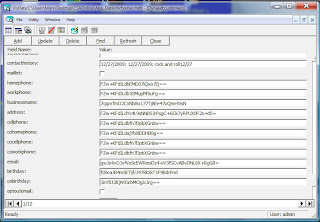
Here is a screen shot with a sample of the encryption. It is (as far as I know and have studied) un-crackable.


Here is what the main screen will look like.


On the upper left, notice the "Money Made"--you can keep track of where you are. Under that are a ton of quick links. Next to it are some easy to use search functions and then lists of your customers sold this month, hot prospects and pending sales/sold orders. To the far right is a "To Do List" as well as your appointments.

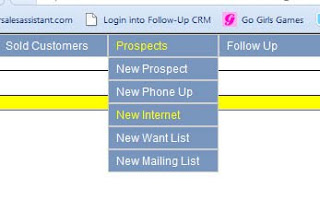
If you notice the menu, it is a pull-down type and makes it easy to create certain types of customers or prospects. Here is an example of creating an internet lead.


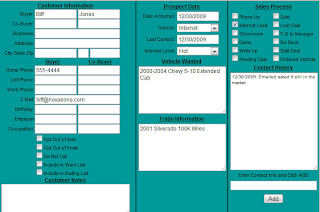
After you click NEW INTERNET, you are taken to the PROSPECT SCREEN to enter the internet lead's information. From there you can edit data, track contact history, print letters, set appointments, send emails and more! Here it is.


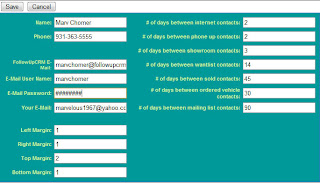
If you will notice, unlike my previous versions of CSA, only important information for prospects are on this screen. I also made it where you put "Vehicle Wanted" and "Trade Info" into text boxes without having to have a field for Year, Make, Model, Color, etc. It makes it a lot easier and faster to create a prospect or customer. Notice the "Contact History" on the bottom right. Put what you talked about in the text box, click ADD and it is added to your history. If you print a letter or send an email, it is automatically added to your contact history. See the field that says "Last Contact?" When you add to your contact history (or print a letter or send an email) it makes that into todays date so in the main form, you can call certain types of prospects or customers at certain intervals. Here is a screen shot of the settings where you can set up your own values for call intervals.


In this example, I will contact internet customers every 2 days and sold customers every 45 days, etc.

What about automated follow up? FollowUpCRM.com makes it very easy. The easiest it has ever been in any of my programs. You can create your own custom letters and emails and save them for laster. The program automatically merges your data with them. By the way--the emails are full HTML so you can have colors, images (you have to link to them on an external website), different fonts, etc. Here is a screenshot of the word processor.

See the stuff like ~firstname~ and ~lastname~? FollowUpCrm.com merges that with your data. If you print a letter, it is converted to a PDF file and you can use a pdf reader like Adobe Acrobat (free from Adobe.com) or any other one to view and print the letters.

Setting up follow up is very easy now. Here is a screenshot.

In this example, 1 day after a sale, it will generate a letter for a sold customer that is either new or used that has paid cash, financed or leased. You can break it down and send a csi letter (for example) to only new car cash deals 14 days after the sale. You can have an unlimited amount of follow up items and it can generate phone calls, letters or emails. Also, if you set up a follow up email for an internet lead and they come in and buy, the program will know this and quit sending them follow up emails as a prospect and switch over to sold follow ups.

Speaking of email, when you are a paid user (not available with trial) you will get your own FollowUpCRM.com email address. You will be able to use it to send emails to your customers. You can send a monthly news letter, a thank you email, etc. If someone responds to the followupcrm.com email, it gets replied-to your real email address so you can use it as usual. I have to give users a followupcrm.com email address because that is the only way that godaddy (my host) will allow people on my website to send email and because it will stay out of spam filters better if the email is from the hosted website.

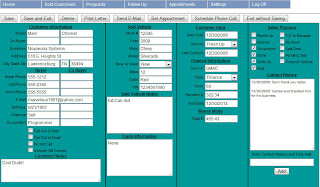
One more screen shot of the program in action. This is the customer screen. Notice the differences between it and the prospect screen.


Oh yeah--did I mention that this program works well over a cell phone? At no extra charge? Proof is in the pudding. Here is a screenshot of the program in use via my I-Phone. That is an older version of it so the final product might look a little different (the zip code won't be wrapped for example...)


Well, everyone, as you can tell, I am very excited. I hope you all give my new program a try. I'm even going to have a button that you can click if it helps you sell a car so everyone can see how effective it is.

Best regards and Happy New Year!
Marv Chomer


Friday, March 6, 2009

CSA 7 Screenshot and Some Features


Here is a screen shot of Car Sales Assistant 7, the newest version of our follow up CRM software for car salespeople.  Here are some things of note...

Notice all of the quick links on the upper left side of the screen.  21 in all.  Here are some of the cool new ones...

  • Today's Customers:  All people that you have talked to today--whether they are internet leads, phone ups, showroom prospects or sold customers.  So--if your manager says, "What have you done today, " you can show him or her!
  • Internet Leads/Phone Ups: They will show up on this list until you sell them, they show up in your showroom or you mark them as "lost."  Why is this cool?  Well, you don't want to forget about them--if you set an appointment (and that is all you should do over the phone or internet) and if they show up--you will have a 50% average closing ratio.  Get 20 to come in and sell an extra 10 cars!!!
  • Expiring Leases: You can see a list of leases about to expire within X amount of days.  You can set X to whatever value you like--3-6 months is the best for me!
  • Customers/Prospects to contact: If you want to call a working prospect (current prospect in the program, that is...) every 2 days then you can set the value to 2 in your settings and any prospect who doesn't get contacted within 2 days will show up on this list.  This goes the same for customers.  You can actually set different values for both customers and prospects like every 45 days for customers or every 3 for prospects.
  • Family in Market: Very cool stuff--this alone will pay the price of admission!  According to Joe Verde, 30% of family members have someone who will be in the market for a car within 3 months.  What is so great about this?  Well, if you at least KNOW what the family members are driving (and CSA7 makes it very easy to track this) then you will have an opportunity to contact them and perhaps sell a car (with over a 65% closing ratio for all you math wizards!)
This Month's Progress: You can now see what your averages are for each category.

I'll be the first to admit that Car Sales Assistant 2008 is confusing.  To log a lead, you have to follow these steps...

  1. Click LOG CUSTOMERS
  2. Read a thing that tells you what to do. 
  3. Search for a customer to see if they haven't been logged before.
  4. If they have been logged, click them.  If not, click NEW ADDRESS.
  5. Edit the personal data.
  6. Click LOG THIS CUSTOMER.
  7. Put in all of their prospect and purchase information.
CSA7 makes it easier.
  1. Click NEW CUSTOMER menu and pull down to the type you want (Sold, Phone Up, Internet, Unsold Prospect)
  2. Bam!  You are now on the customer screen where you can enter their data.
About 50% of the people who bought CSA2008 had questions on how it worked and I had some people say it was a "clumsy" interface, hard to understand, confusing, it sucked, etc.  I had a method for my madness but I think CSA7 will apeal to more people with its ease of use.

Notice that all the data for your customer is on the screen.  At the dealership where I work, we use an untra-expensive CRM that really sucks.  Here is what I need to do when I make a follow up call.  I have to click on the person and see what vehicle they drove.  Click on the notes to see what I talked about last time.  Exit the screen and then click on the button to make the call.

In CSA7 all of that data is on one screen so you can just click, call and watch the $$$'s roll in!

Family Members: This is a feature that I had in earlier versions of CSA (not 2008 though) that I really missed.  It is a great opportunity to sell more cars.  When you call a customer, take a survey and ask them about all the drivers in their household.  Ask what they are driving and put the info in.  If they are leasing, for God's sake--put in the date their lease expires so you can call them if they qualify for a pull ahead or when their lease expires.  Ask them who is next in line for a new or used car.  Enter a date when they will be in the market and guess what--remember the quick links?  This family member will show up on the quick link when in the market or when their lease is about to expire (or pull ahead...)  Do this for every one in your database and you will never have to catch a fresh up again.

Whoops--please note that this is a beta version and missing some of the buttons on the customer screen.

This program will be released in 2 days.  I will charge a nominal fee for previous users to upgrade to this if they like.  In the intial release, there will be no import functions but I will add them later (like from earlier versions or from spread sheets.)

Is there anything you would like to see in CSA?  If so, let me know!

Thanks so much for reading this blog.  Things are really tough right now in the car business (especially here in Michigan) but if you work hard, you can still make selling cars work for you and make tons of money in this business.  CSA7 will make it easy to work hard and accomplish your goals.

Marv


Friday, December 12, 2008

New Update for CSA 2008 Coming Soon!

Hi, Everyone! Hope all is going well.

I've been working on a new update for CSA 2008. Fixing a few bugs and I've added a new feature that allows you to easily backup your data without having to browse-to and copy folders. If I get froggy, I'll also add the ability to import your data from a spreadsheet.

I'm also working on a new manual for CSA 2008 that should make a lot of things much clearer.

Please check back from time to time for updates.

Marv

Tuesday, December 2, 2008

Car Sales Assistant 2008 Video Tutorials

Hi--I have just finished some video tutorials on how to do a few things on Car Sales Assistant 2008. There will be more to follow. If you would like to see something in particular, please let me know.


How to Log a Customer
CLICK HERE to Download the Full Size Video in WMV format.

This short video explains how to log a customer into CSA 2008. It also shows a quick overview of the customer screen including the difference between a phone up, prospect and sold customer as well as what all the check boxes do on the customer screen. This is the heart and soul of CSA 2008 so this video is pretty much a "must see!"


How to Make Phone Calls to Customers and Prospects
CLICK HERE to Download the Full Size Video in WMV format.

CSA 2008 automatically schedules follow up phone calls for your phone ups, prospects and sold customers depending on when you want them to be created. The phone ups show on the left side of your main screen as the number of calls that need to be made. Click the number and you will see a list of people who need to be called. These people will remain on the list until you actually call them. When you call them, you must "Complete the Phone Call" to take them from the list. This also gives you the option to leave notes as to what you talked about so you can build rapport with your customers.


How to License Car Sales Assistant 2008
CLICK HERE to Download the Full Size Video in WMV format.

When you download the fully-working trial copy of CSA 2008, it works for 14 days. To continue using it after this time, you need to purchase it. After purchasing it, the program must be licensed since it is copy protected. Your data that you enter will still be there.

I know copy protection is a pain but I have put a lot of time and effort into my software and I don't over-charge for it. If I didn't have copy protection--well, you know what would happen. One person would buy it and the rest of the dealership would get it for free. ;-)

More to come!

Sunday, November 23, 2008

"I Need to See if I Have a Job Before I Can Buy a Car."

"I need to see if I have a job before I buy a car."

I hear that daily. I sell cars in Michigan and it is no surprise that if the Big-3 disappears, so will Michigan. Most of the jobs here depend on one of the Big-3--whether it is a supplier, restaurant, car dealership or your average car salesperson (GULP!)

Well, I find it very hard to believe that the government will let that happen. After all, the Big-3 pretty much helped win World War 2 with its manufacturing base and GM helped save this country's economy after 9-11.

So, why the wait?

Well, to put it bluntly, a third of $25 Billion is enough to give, for example, GM a couple of months before they run out of cash. Our government that can spend $20 Billion a month in Iraq to help people who pretty much by now hate us wants to make sure that they don't throw away month that may cause the war to end (by lack of funds) one month earlier.

In other words, they want to make sure they get paid back. They want the Big-3 to be able to change their business practices so they no longer lose money but can pay it back. This will of course require concessions with the UAW, suppliers, excess dealers, etc.

You know what else it will require?

They will need to sell more cars!

OK--now we get to the meat and potatoes of this article.

Right now, I am doing nothing but calling customers. Unsold prospects, previous customers, etc. They are all telling me they want to wait until they see if GM is still there before they buy or if they will have a job.

I think GM will get their bailout and I think they will strive to sell more cars because right now, dealerships are not buying cars from GM and guess what--dealerships are really GM's customers, not the average consumer. The only way dealership will buy more cars is if they sell the ones they have right now (or at least think they will sell the ones they have right now.) Surely, someone at GM will be smart enough to see the relationship and make it worth it to buy a GM car, truck or SUV.

SUV? What's that? Oops--gas is back under $2.00 per gallon so I went back to my old ways. Sorry about that...

Car, truck or crossover.

What does that mean to you?

It means this: start a "vehicle shopping service" for your customers.

What is a "vehicle shopping service?" It's simple. You ask your customers what they want, when they want it, how much they want to spend and tell them that you check the programs daily and will call them when it is the optimum time to buy. When it becomes that time (after all of this blows over) then call them all and say, "Now is the time!" and you will sell a ton of cars.

I know it's stressful right now. I sold 15.5 last month--made a lot of money, led the dealership in the roughest market in the country (Michigan) and have exactly 0.5 out right now, November, 23. But I keep plugging away making my calls. When all this blows over, I will probably have a 30 car month.

It is hard to stay positive but we must. We are a rare breed. We have huge highs and huge lows but if you can make it through these lows and learn some great habits, you will have some VERY HUGH highs in the future.

Also, it is a great time to use a program like my Car Sales Assistant 2008 follow up CRM software. For time time being, I am offering a 25% off coupon because I know times are tough (and I only have 0.5 cars out... ;-) so use coupon code TAKE25 at checkout to get the discount. This is only for a limited time, by the way.

Here is a link to my store where you can purchase if you'd like...

Whether or not you use my software, I appreciate you reading this blog. Hopefully you can find one little tidbit to help you make a sale and get you through the roughest patch we will ever see in our careers.

Marv

Sunday, June 29, 2008

Update of CSA 2008 is Online 7/5/08

Hi--as of 7/5/08, the newest update for Car Sales Assistant 2008 is up and running. If you have anything less that 2.0.7 7/5/08 on your mane page, download and install the update.

The main fix was a crash when logging a new customer ("error in follow up NEWROW") as well as the screens not lining up when creating a new address or customer.

Also, I am taking people down to be affiliates to sell copies of my program for me. Please contact me if interested--it will be an easy way to make some extra $$$!

I also added a "start page" that gives a good overview of the program. You can disable the start page at any time.

You can download the update here. You will then need to unzip it (open it) and copy all of the contents into your CAR SALES ASSISTANT 2008 folder that is either in your WWW.CARSALESASSISTANT.COM or NOVAEONA SYSTEMS folder in PROGRAM FILES (hope I'm not confusing... so here.)

1) Double Click MY COMPUTER or COMPUTER for you Vista users.
2) Double click C: Hard drive
3) Double click PROGRAM FILES
4) Look for either WWW.CARSALESASSISTANT.COM or NOVAEONA SYSTEMS. Double click it.
5) Double click CAR SALES ASSISTANT 2008. Copy the contents of the file that you downloaded (after opening it) into this folder and over write the files when prompted.

You may need to re-license the software but I think you will love the change--I know I do.

If you haven't downloaded the full program yet, you can download it here. Open the file after downloading and double click the SETUP program to install. Follow all the prompts.

Marv
www.carsalesassistant.com


I'm Updating Car Sales Assistant

Hi, Everyone!

I have been hard at work updating Car Sales Assistant 2008 and just wanted to let you all know what is going on.

  • I am aware of a problem with Vista machines where you can't choose a letter or a picture--the program just goes into la-la-land. It is a problem with the copy protection I am using--it is conflicting with the Windows based open dialog. I am working with the people who created the copy protection to get a fix going. As far as I know, it is only a problem with Vista, not XP, etc.
  • I never was a big fan of how the windows in my program interacted. You could move the main one and the customer ones would stay in the same spot. Well, I just learned how to make a window (form) within a window (form) and it looks nicer, you can now minimize the whole program, etc.
  • I have a deep down feeling that the follow up is not working right so I am re-writing it from the ground up. Here is what is going to be cool about the new system. Lets say you want to add a 30 day letter. In the old way, if you already created your letters, it wouldn't add a new one. Now, if you make a change to your follow up schedule, it will effect all of your customers which is a good thing.
  • I am trying to implement a follow up every X amount of days like a call every 30 days for example.
  • I am going to be adding pop up message reminders. I had this feature in CSA 2007 and everyone seemed to love it (and are asking for it) so I will be adding it. Here is an example of what it will be able to do. If you have an appointment set for 10:00am, it will pop up 15 minutes early to remind you--kinda like the appointment scheduler we use on cell phones.
Also, I will be adding some new content to my website such as...
  • A free online lease or payment calculator
  • A free forum for salespeople to get together and compare notes, techniques, recipes, etc.
Finally, one more thing that I will be adding is this...

Gas is high right now, money is tight so here is your chance to make a few extra $$$'s! I am going to be adding a referral system where you can have your buddies check out my program. If they buy, you will get $$$ from me--the more that buy in a month, the higher your commission rate. I get a ton of referrals and I think the people who are kind enough to show others my program should be rewarded, don't you?

With a partner, we are working on an online version of Car Sales Assistant where you can do your business from ANY computer (home, work, etc.) More on that later.

And finally, I am working on a dealership version of my program that will sell for a lot of money to you and I (but not to dealerships) so the payment for referrals on this one will be a lot of money--we're talking hundreds of dollars if you show it to your dealership and they hook up.

For all of you who have found bugs and been patient while I worked on them, I bow to you and give you sincere thanks.

Marv Chomer
www.carsalesassistant.com


Wednesday, April 9, 2008

CSA 2008 Update is Up and Running!

Hi, Everyone. I just uploaded the new build to CSA 2008. Here are some of the new features.

  • Email support! You can now email individual customers by clicking on their email address or send mass emails to all of your customers, or any customers that you search-for. For example, if you want to send an email to every customer who bought a "Cobalt" for example, do a search first and then email them all messages.
  • Support to import from CSA 3.0, CSA 4.0 and CSA 2007. All you do is browse to your CSA files and click import and you will be all set.
  • I changed LOG A CUSTOMER to LOG AN "UP". Also, there is now a search screen that pops up so you can see if you already have the customer in your master record. A lot easier to use now.
  • You know the MONTHLY PROGRESS thing on the left hand of the main screen? It, by default, shows your month-to-date in sales but you can change it to any 2 dates now such as 1/1/08 to 12/31/08 to show your year to date if you prefer. I had a dealership that purchased my software that had weird months so I did it for them and thought it would be a great feature for everyone else.
  • Added new tutorials.
Download the newest version here. Also, if you already have CSA 2008, you can update by following the instructions on these tutorials.

If you find any problems with any of it, please contact me via my website www.carsalesassistant.com

Thanks,
Marv

Monday, April 7, 2008

CSA 2008 News

I've decided to take a week off of work so that gives me more time with my family and it gives me more time to work on CSA 2008. I've already added import functions so users of CSA 3, 4 and 2007 can convert their data and that seems to work bug free (at least on my computer.)

I am also adding email support as we speak. I've already added a function where you can click on an email in the customer screen and send an email to your customer. I will also be working on sending mass emails to your customers (like if you are having a sale.) Right now, the email is only text based but I will be adding HTML email in the future. Also, you have to have an email with SMTP sending to use the email (most emails qualify but some free ones like Yahoo won't unless you upgrade to their premium email.) I believe GMAIL allows SMTP sending--basically, if you can send email with outlook express or microsoft mail, you should be fine.

Also, my website www.CarSalesAssistant.com was down because I forgot to re-new it but after jumping through many, many bureaucratic hoops, I finally have it back up.

On a somber note, what the hell is happening with the Detroit Tigers? Man--0 and 6!

Best regards as always,
Marv Chomer
www.CarSalesAssistant.com


Saturday, March 8, 2008

12 Years of Funny Stories

March 3, 2008 was my 12 year anniversary of selling cars. I've seen some funny things and I've seen some stupid things. I'm going to share a few of them with you.

I remember one time we were moving around the lot in Tennessee. One guy hopped in a new Silverado and gunned the motor to a very high RPM. Something blew and some fluid (transmission perhaps) started pouring out of the bottom. He looked at us (there were about 5 of us watching) and said, "I didn't do it!" The funny thing was--he was dead serious and I really think he thought he didn't do it!

I remember another time, it was raining slightly and I was walking with a woman and her daughter--about to show them a Chevy Tracker. I walk talking about the tracker and looking at them while we were walking. There was a truck parked with a trailer hitch sticking out. I didn't see it and absolutely smashed the soft part of my knee into the ball of the hitch and flipped over it into the muddy rainwater. Without missing a beat, I got up--eyes watering on the verge of crying--and kept talking about the tracker. To this day--I wonder what they thought of it!

I have 2 memories of people walking into the glass showroom wall. One time, there was a guy named Jim that I worked with. We had a glass room that we trained in. Someone bought catfish for all of us and Big Jim walked over to a box of it and opened it. "Boy--that sure looks like some good catfish!" he said as he walked off--smashing his 260 pound body into one of the glass walls. The entire room shook and I laughed my ass off as he shook the cobwebs out of his head.

The other time was when a customer of mine, we'll call him Bob, came in to look at some cars. Bob was around 70 years old and his son was with him. We used to park cars along the front of the dealership and our showroom was all glass. Someone sold one of the cars so there was an empty space. Bob looked at it and said, "Oh--I see you have it opened up." I was confused. Was he talking about the missing car? "Uh, yes," I said. Bob then went full blast and walked into the glass wall right were the car was missing and smashed into it. I had one of those laughing fits when you can't stop. I couldn't help it. I looked at Bob's son and said, "I'm sorry... I can't quit laughing!" Hey--you laugh when you watch America's Funniest Home Videos and when it happens live--it's just as funny.

There was a guy I worked with named Donnie. We called him Big Donnie and he was a monster--about 6'6" and about 300 pounds of muscle and beer gut. One day, Donnie was in the F&I office sitting with a customer. His big hairy arm was hanging out of the doorway and for some stupid reason, I decided to rip a big pinch of his arm-hair off. I grabbed a hunk and ripped it right off of his arm. Big Donnie didn't flinch and just turned to me. His eyes did the talking. He was gonna kill me. "Oh my God!" I thought to myself. "What the #@$%& was I thinking?"

All day, Big Donnie didn't say a word to me. I tried to stay away from him and made it a point to walk all around the dealership if I had to avoid him. He would just give me that look like he was going to rip my arm off and beat me to death with it. I was scared shitless. Finally, I went over to him and said, "Donnie--I don't know what I was thinking. Sorry..."

"Marv," he said, "I'm gonna kill you after work." He probably meant it!

"Donnie--please. I just lost it. Tell you what--it's about 90 degrees outside. What if I pull your keys for you? Will you let it go?"

Donnie was a big guy--heat really effected him. He looked outside and looked at me. "Pull my keys and give me that little phone book you have on your desk and I won't kill you." The phone book was one of those cheap yellow pages one they give away so I agreed. Needless to say, I'm still alive to write this blog so Big Donnie didn't kill me.

A couple more about Big Donnie. One time we were at a bar shooting some pool. Donnie was shooting and accidently backed into a guy shooting at another table. The guy turned around like a bad ass and looked up at Donnie--his face turned pale. He then turned to me and said, "I shouldn't mess with that guy--should I?"

"Uh, no." I answered.

I worked with a guy named Dan--a real funny, life loving little guy who didn't give a damn about anything in the world. He always giggled and just had fun. One time, we all went out to dinner (we hit our goal so the dealership took us to a place called Dale's Steak House--maybe you heard of the steak sauce? Best steak in the world!) Dan was a little buzzed (well, a lot) and everyone went to a bar afterwards. Dan was bouncing around trying to dance and bumped into a guy. The guy turned to Dan and yelled, "You got a problem?" Dan giggled and turned to Donnie. "Donnie--this guy thinks I have a problem." Big Donnie turned to the guy and said, "He ain't got no problem!" The guy agreed.

One more Big Donnie story. I used to play cards every wednesday with the guy who blew the trans and Big Donnie. I make it a point to never drink when I play poker. Big Donnie had been drinking all night and kept winning this certain game we kept playing. I said, "Donnie--if you win that game again, I'm gonna kick your ass." I was joking just for the record. Big Donnie turned to me--drunken sweat pouring from his face--and poked me in the chest with his huge finger. "Hoss," he said, "I'm gonna hold you to that."

"Oh shit," I thought to myself. Once again, what was I thinking? Well, Big Donnie was very drunk so I just assumed he would forget about it. He actually won that game again and didn't say anything to me about it--or my challenge. Thank God! The game went on for about an hour longer and ended. Donnie said, "I gotta hit the can. When I get out, I'm gonna kick your ass." Oh Shit!

"Donnie--I was just kidding," I pleaded.

"You better be here when I get out," he snarled at me. I nodded my head weakly as the bathroom door closed behind him. As soon as I heard the lock click into place, I ran for the door. My demo was about 25 feet away. I fumbled with my keys and I ran towards it. I had the sinking sensation in my ass that it was about to be kicked clear over my shoulders. Just like in the movies, the keys kept fumbling in my fingers and I tried to find the right one to open the door (my demo didn't have remote keyless entry.) I finally found the right one and scratched the hell out of the paint around the keyhole as my shaking hands tried to put the key in the hole. FInally! It unlocked and I hopped in the car. I quickly started it, put it in reverse and gunned it, squealing the tires and I hauled ass out of there. I got away! The next day--Donnie didn't say a word to me. He never did since then. Phew!

It's getting late and I have to sell cars tomorrow so enough bed time stories tonight.

If you liked any of these stories, please buy a copy of my Car Sales Assistant 2008 software! Thanks in advance.

Marv

p.s. Respond with your funny stories! We'd love to hear them.

Sunday, March 2, 2008

CSA 2008 Update and New Tutorials

Hi, everyone.

I am very happy to say that I have a new update to CSA 2008. There were a lot of problems with download and installing the program. Also, the copy protection was a major pain in the ass. I have fixed both of those things. You can download the newest version here but make sure you check out the tutorial on how to update from an older version.

Also, I fixed the Monthly Stats on the main screen--they now are more accurate and reflect split deals in your stats.

I also made some cool tutorials that install with the program (press HELP on the main taskbar to view them) They can also be viewed on my website by clicking this link.

Please rest assured that I am constantly working to improve my software. Please report any bugs to me and I'll try my best to squash them. I have found, though, that some bugs are caused by not reading instructions so please check out the tutorials.

Thanks a billion!

Marv

Tuesday, February 19, 2008

Car Sales Assistant 2008 Update Coming

Hi! I want to thank all of you have tried Car Sales Assistant 2008 and I would especially like to thank the people who have purchased it.

I am working on some updates right now--hopefully they will be done in the next week, or so.

Here are some of the things it will have:

1) Some people have reported that the program will not run at all. This is usually a problem with the copy protection. I am in works with the people who wrote the copy protection and will have a different version on the next update that should get rid of that problem. The only drawback will be that people who have already registered will have to email me a new code unless I go to the online registration (see below somewhere.)

2) I am currently working on the code to convert data from CSA 2007 to 2008. Earlier versions like 4.0 and 3.0 will come next. There are no plans for updates of CSA 2.0 or CSA 1.0 data at this time.

3) Some people have reported that they cannot delete a customer. That will be fixed.

4) There is a crash if you put more than $999 in your commission. That will be fixed.

5) Hopefully I will be adding email support on the next update. Email is so touchy--I just want to make sure it works for 99% of the people out there.

6) Speaking of the new copy protection--I may try out a new licensing system where you can visit my website to obtain your license code instead of having to wait for me to email it to you. This should alleviate a lot of headaches--mostly yours!

7) Down the road--I'm going to develop a--well, let's call it a "person list" of your customers that you can default to. For example, if you want--it can show you everyone you sold this month as well as your working customers--or whatever 5-10 options you desire. This is still in the planning stage and down the road.

Also--I will be working on more tutorials. I had some video files but everyone said they could only hear me talking and couldn't see the video. Whoops! It worked on my computer! So--I'm opting more for tutorials with screenshots and text instead of me talking--I talk fast anyways so I'm sure I'm hard to understand. You can see the current tutorials here.

Check back here from time to time or at my website for further updates and when it is done.

Marv

Wednesday, February 13, 2008

I'm Still Offering CSA 2007

I just wanted to let you all know that I am still offering Car Sales Assistant 2007. Some people reported to me that they like it better than CSA 2008 (maybe some people just resist change...who knows.) so I decided to make it back available at the low price of $59.99 per copy.

I firmly believe that Car Sales Assistant 2008 is my best program yet and I urge you to give it a try right now but if times are tough and you want to save a few bucks, by all means--try CSA 2007. Please keep in mind--I am no longer working on CSA 2007 since I am putting all of my efforts into CSA 2008.

Download CSA 2007 Here or Download CSA 2008 Here.

Thanks,
Marv

Tuesday, November 20, 2007

Car Sales Assistant 2008 Status

I just wanted to give you all a quick update on Car Sales Assistant 2008. I had a sick day today (bad sore throat and cough--hard to sell cars if you can't talk...) and got a lot done today.

There is a good chance that CSA 2008 will be done by the end of the month--definitely by the end of the year but who knows...probably sooner.

Here is a cool thing I added today--automated follow up letters after you create a customer or prospect. The program can now send letters if you get a phone up and they don't show up (of course, you'll have to have their address...) for example: Dear John, thanks for talking to me on the phone. I look forward to meeting you in person. Please call me at 555-5555 if you need to reschedule. This is an example of a phone up letter for someone who hasn't shown-up yet. If they do show up, the program is smart enough not to print the letter.

Here is another example: letters to unsold prospects. Thanks for stopping by... If they come back a buy, you don't want to send any more prospect letters to them--the program automatically deletes those letters that don't qualify anymore.

Or best yet--lets say you lease someone a car and generate a letter to hit 30 days before they are scheduled to turn in their lease. If they come in and buy before then, all you have to do is un-check "Vehicle Currently Owned" in their screen and the letter will not be generated.

Hope all of this makes sense--I'm hopped up on cold medicine and I do tend to type pretty fast.

The biggest change to csa 2008 from earlier versions are the fact that prospects and customers now share the same record--I get emails all the time... How do I convert a prospect into a customer? Now, all you do is check the SOLD button and they are now a sold customer. I'll admit--I made some bad decisions in earlier versions...

Please check back on www.carsalesassistant.com from time to time for further updates.


Friday, November 2, 2007

Future Products from CarSalesAssistant.com


A lot of people have been asking me about new versions of Car Sales Assistant. I'm very happy to announce that I am in fact working on a couple of new projects including a totally new version of CSA. It is being programmed 100% from the ground up and is taking advantage of Microsoft's new .NET platform which probably means more to me on a programming side than you on a user side.

Here is an early screenshot of the new CSA--I don't have a name for it yet but have been calling it CSA 2008 while programming it. Keep in mind that the final product will look a little different but this is very close.

On the upper left hand of the screen are QUICK LINKS such as Sales this Month, Sales Last Month, Hot Prospects, etc. It will show you the number of people who fit that criteria and you simply click the number to see the lists.

In the middle left, you can see a running total of your current month--money made, averages, etc.

On the bottom left is a QUICK SEARCH box--great if you see a car pull up--you remember selling the car but can't remember the customer's name--type the model and color in the box, click search and see who it is. I'm 40 years old and my memory isn't what it used to be so this works great for me!

If you have used previous versions of CSA, you'll remember that there were separate databases for sold customers and unsold prospects. Now they are both contained in the same database and simply checking SOLD determines if it is a customer or an unsold prospect.

Also, in earlier versions, keeping stats involved you typing in how many ups you had on any given day, demos, closing situations, sold, etc. Now those stats will be taken directly from the customer database to keep you from typing more.

Remember earlier versions of CSA? If you had the same customer buy multiple cars, you had to re-type the name, address, etc. for all the new records. Now there is a master database that contains all of the people you come into contact with. Now if you sell a person car #2, all you have to do is click on the master record and if there are changes to their address, it is automatically changed for all the records. Click on the master record and you will see a list of all the cars they have bought from you, all of their family members who have bought from you, all your contact (follow up) with them as well as family members who are in the market for a car since 20% of all families have someone in their household who will buy a car within the next year.

By the way--the picture is one of my daughter (the picture within the picture) who is now 5 and my 3 month old son--I was just amazed how much alike they looked when they were born so I snapped the picture of my son next to the picture of my daughter.

Back to my software...

I will be working on a dealership version of CSA 2008 that will have manager reports, orphan owners, csi tracking, etc.

We are also working on online versions of our software that will allow you to work with your data from any internet browser including the I-Phone, etc. We will charge a small monthly charge for the online versions instead of the one-time-fee of the ones that you install to your computer.

Please feel free to contact me at any time with any suggestions of things you would like to see in my next version--it's never too late to add things!